
One small binary
The client is a single executable of 3.1–4.5 MB with no runtime. The relay is about 1.4 MB.
Your own relay
One Dockerfile that Coolify builds as-is, a prebuilt image on ghcr.io, or one systemd unit. No database, no state.
No accounts
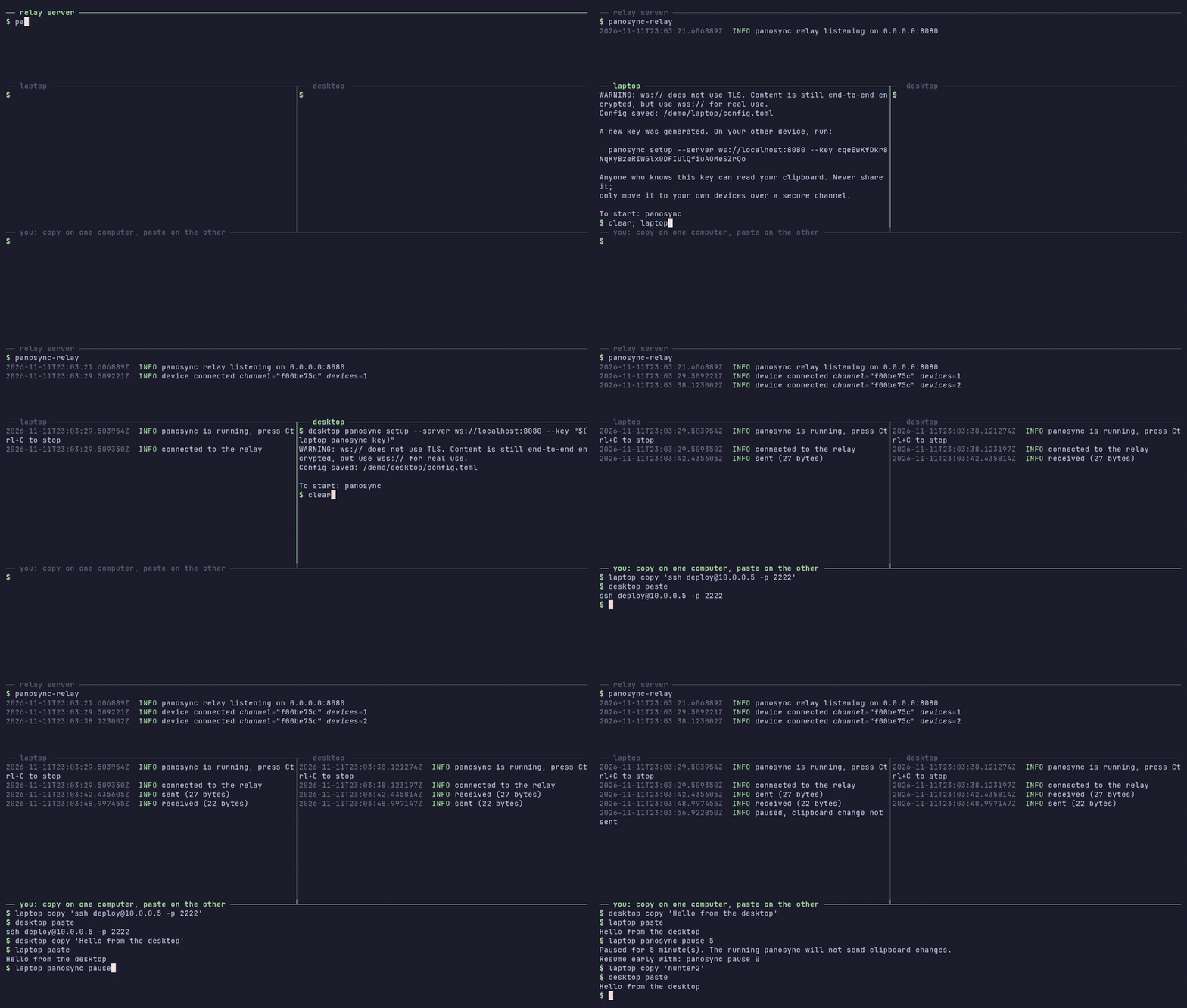
Setup on the first device prints the one command to run on the others. That's the whole pairing.
Text only, on purpose
Copy on one machine, paste on another. Logs show byte counts, never your clipboard.
How it works
- One key.
panosync setupon the first device generates a random 32-byte key that never leaves your devices. - Two derived values. Each device derives an encryption key and a separate channel id from it with BLAKE3.
- Encrypt, then send. Every clipboard change is sealed with XChaCha20-Poly1305 and sent over
wss://. - Blind relay. The relay groups devices by channel id and forwards the bytes. It never sees the key or the text.
Full protocol and threat model: docs/architecture.md
Install
1. Run a relay
docker run -d --name panosync-relay --restart unless-stopped \
  -p 8080:8080 ghcr.io/msbayindir/panosync-relay:latest
Put a TLS reverse proxy in front of it (Caddy, nginx, Traefik), or deploy the repository's Dockerfile on Coolify. All options: self-hosting guide.
2. Install the client
# macOS and Linux
brew install msbayindir/tap/panosync
# or, without Homebrew
curl -fsSL https://raw.githubusercontent.com/msbayindir/panosync/main/install.sh | sh
Windows: download panosync-x86_64-pc-windows-msvc.zip from the latest release.
Also available with cargo binstall --git https://github.com/msbayindir/panosync panosync.
3. Pair and run
# first device: generates the key and prints the next command
panosync setup --server wss://relay.example.com
# every other device
panosync setup --server wss://relay.example.com --key <your key>
# then, on each device
panosync
Copying a password? panosync pause 5 stops sending for five minutes.
Security model
Protected
- The text: end-to-end encrypted and authenticated (XChaCha20-Poly1305).
- The key: the relay only sees a derived channel id.
- Replays: random message ids and a 5-minute time window.
- Transport: TLS on top of the end-to-end encryption.
- Abuse: 1 MB per message, 16 devices per channel, 50 messages per 10 seconds.
Known limits
- The relay sees IP addresses, timing and message sizes.
- One shared key: no forward secrecy, no per-device revocation.
- Passwords sync too; there is no password-manager detection yet. Use
pause. - Text only (up to 512 KB), desktops only.